Easy Tab Focus: see where your time actually goes in Chrome — and take it back
A free Chrome side panel extension that tracks real focused time per tab, lets you set daily time limits on distracting websites, and auto-closes the tabs you stopped using hours ago. No account, no tracking, no server.
Who this is for
If you've ever opened "just one tab" and surfaced two hours later wondering where the afternoon went, this is for you. Easy Tab Focus is built for remote workers, freelancers, students, and anyone who finds tab count genuinely hard to manage — people who don't need a productivity guru, they just need an honest mirror and a soft brake.
What you can use it for
Find out how much time you really spend on each site
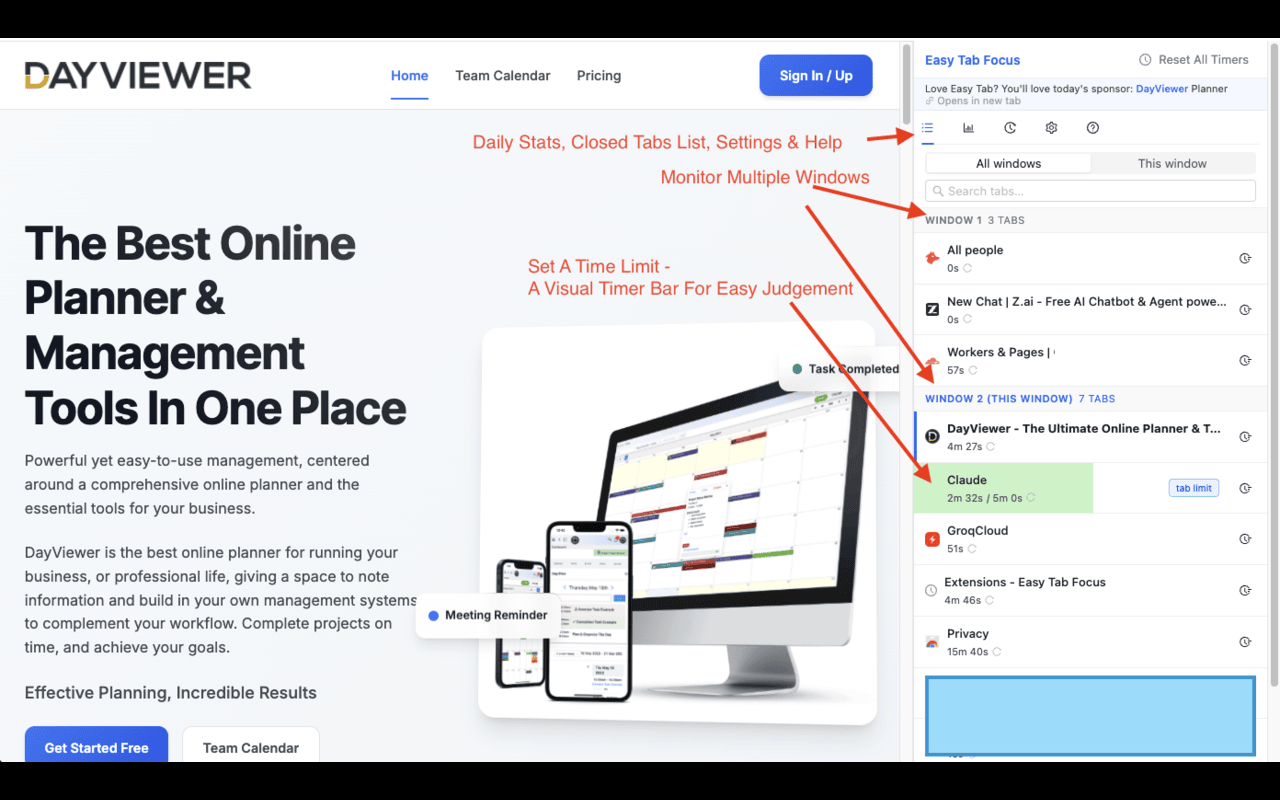
Open the side panel and you'll see live focused time on every tab. Because background tabs are excluded, the numbers actually reflect attention rather than "how long YouTube has been parked there." After one honest day of data, most people are surprised.
Limit time on YouTube, Reddit, X, LinkedIn (or whatever yours is)
Set a daily budget per domain — 20 minutes for YouTube, 10 for Reddit, whatever the right number is. When you hit it, Easy Tab Focus either notifies you or closes the tab automatically. It's a soft block, not a punishment app, which means you actually keep it installed.
Auto-close the 47 tabs you forgot about
If you keep tabs "just in case" and never go back to them, switch on idle auto-close. Tabs you haven't touched in 1, 2, or 8 hours quietly disappear. Pinned tabs are always safe. The browser stays light without you ever having to do a tab purge.
Find a tab without scanning the bar
Instant search across every window — type a few characters from a title or URL and jump straight there. Recently closed tabs are one click away if you reach for something you just shut.
Daily focus stats without a dashboard subscription
A clean per-domain breakdown of where today's attention actually went. Updates live, resets at midnight, and never leaves your device.
How it helps you focus
- Honest data over guilt: seeing the real number is far more motivating than abstract "spend less time on social media" advice.
- Soft limits beat hard blockers: a notification or auto-close is enough nudge for most people, and crucially, you'll keep the extension on long-term.
- Tidier browser, cooler laptop: idle auto-close keeps memory and CPU usage from creeping up as the day goes on.
- Always in peripheral vision: the side panel keeps focus stats visible while you work, without taking over the screen.
Privacy & no-account promise
Easy Tab Focus only reads what it needs: tab titles, URLs, and focus state. It does not read page content. It does not send any data to any server. There is no account, no signup, no analytics, and no telemetry. The Help tab inside the extension shows exactly what it does and which permissions it uses — nothing is hidden.
FAQ
Does this work like a Chrome screen-time tracker?
Yes, but more accurate — it tracks focused time (the tab is active and you're looking at it), not "how long the tab has been open." That's a much better signal of where attention actually went.
Can I block websites entirely?
Easy Tab Focus is built around soft limits — a notification or auto-close when you exceed your daily budget — rather than full site blocking. People tend to keep soft-limit tools installed for years; hard blockers usually get uninstalled in a week.
Will it close a tab I'm actively using?
No. Idle auto-close only acts on tabs you haven't touched within the window you configure (1h, 2h, or 8h). Pinned tabs are always exempt.
Do I need to sign in or create an account?
No. Easy Tab Focus has no account, no signup, and no email capture. All settings and stats stay in your browser.
Is it free?
Yes — free on the Chrome Web Store with no paid tier. Cool Easy is sponsored by DayViewer.